Mock Interview Practice
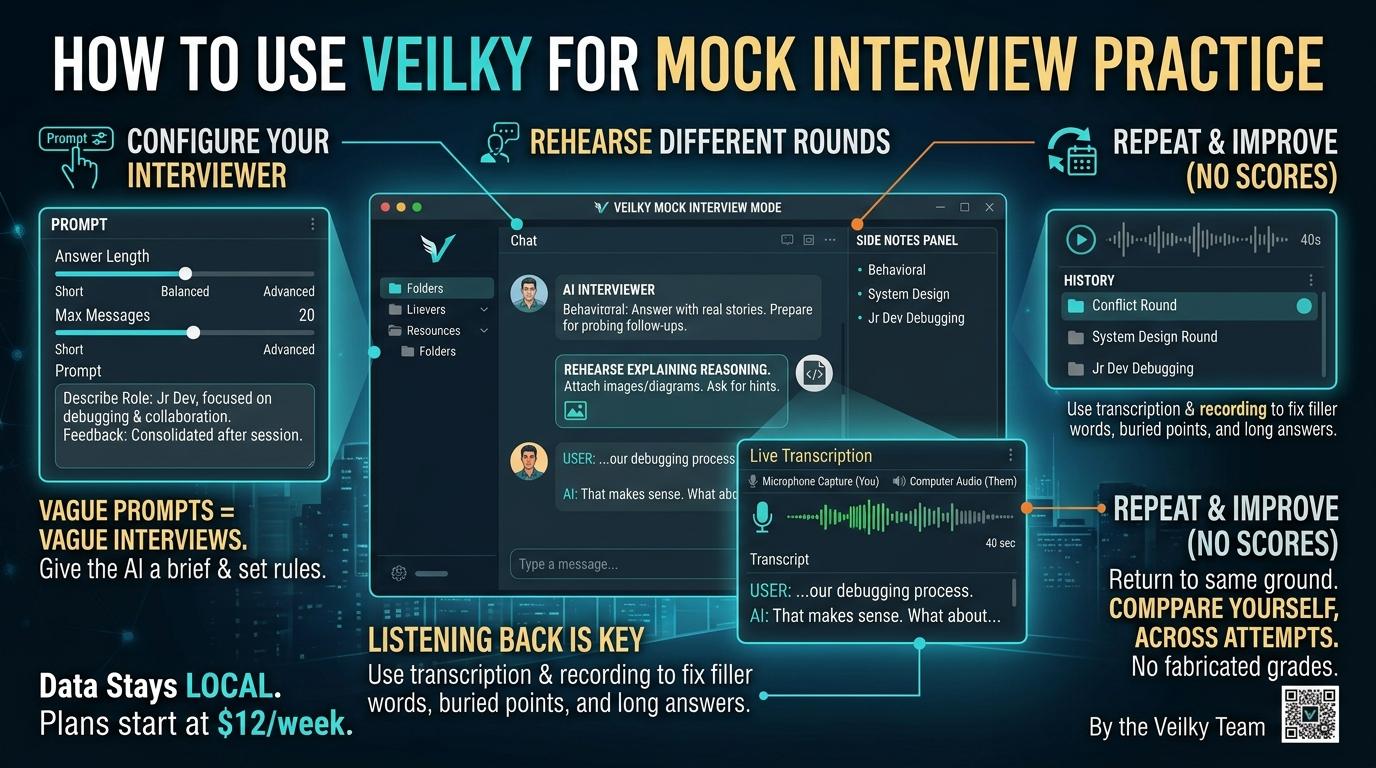
How to Use Veilky for Mock Interview Practice
There is a specific kind of failure that only happens out loud. You know the material. You have thought the answer through. Then a question arrives, and the version that comes out of your mouth is a rambling, out-of-order thing that buries the point in the fourth sentence. Reading notes does not fix this. Only speaking does.
That is what mock interview practice is for, and it is the reason we built Veilky's chat to work as a practice interviewer rather than only as an answer generator. What follows is how that works, and—just as importantly—what it is not.
What This Actually Is
Veilky does not ship a separate automated assessment product with a scored mock interview module. What it gives you is a general AI chat that you configure, through your own instructions, to behave like an interviewer.
That distinction is deliberate. A scripted assessment engine can only test what its designers anticipated. A prompt-driven session can be reshaped the moment you realize the round you are preparing for is more about debugging collaboration than about algorithms. The flexibility is the feature.
Because it is prompt-driven, the setup happens in the chat itself, using the prompt instructions and defined prompts we already provide. You are describing a scenario to the AI and setting the rules of engagement—not filling in a role field in a settings panel.
Setting Up a Session Worth Practicing
The quality of a mock interview is largely decided before the first question. A vague prompt produces a vague interviewer who asks generic questions and accepts generic answers.
Give the interviewer a brief. Describe the role, the seniority level you are targeting, and two or three skills you want explored. Something like: a junior developer interview focused on debugging, collaboration, and explaining a small project. That short brief changes the texture of every question that follows, because the AI now has a reason to probe rather than just ask.
Control the format. This is the part most people skip, and it is the part that makes practice feel like an interview instead of a search engine. Ask the AI to wait for your answer before offering a follow-up. Specify whether you want feedback after each question or a consolidated review at the end. Choose the latter if you want to preserve the pressure of a real conversation; choose per-question feedback if you are still building the answer and need course correction as you go.
Your "Answer length" and "Maximum recent messages" settings interact with this. Short answers keep the interviewer's questions crisp; a higher recent-message window keeps the session coherent over a long stretch, so the AI remembers what you already covered instead of circling back.
Rehearsing the Rounds That Actually Differ
Behavioral and technical rounds. These fail for opposite reasons. Behavioral answers fail when they are abstract—you describe how you generally handle conflict instead of telling one specific story. The fix is to answer with your real experience, out loud, and see whether the specifics survive contact with a follow-up question. Technical answers fail differently: they fail silently. You say the answer and move on, never revealing the reasoning that would have earned partial credit from a human interviewer. Rehearse explaining your reasoning first, and only then ask for hints or alternative approaches. If a problem arrives as code or a diagram, attach it as an image or screenshot rather than trying to describe it in prose—that is closer to how it will actually land in front of you.
Case-style discussions. Ask for a hypothetical business or product problem, then practice the discipline that candidates most often skip: clarifying assumptions before answering, and comparing options rather than jumping to a recommendation. Treat any figures the AI produces as practice assumptions, not verified market research. A mock case is a rehearsal for structuring your thinking, not a source of data.
Listening Back Is Where the Improvement Happens
Feedback in the moment is useful. Feedback after the fact is where habits change.
This is where Veilky's transcription and recording earn their place. Live transcription writes down what it hears as text—from your microphone for your own voice, from your computer's system audio for the interviewer's side—so you can watch your answer appear as it is spoken. Sessions can be saved, along with both the transcript and the audio. Playing back a forty-second answer and hearing the point land in the last sentence is a far more effective correction than being told about it.
Turn feedback into a next step. Ask for a short list of concepts worth revisiting and, more pointedly, the answers that needed clearer evidence. Then verify technical claims independently. An AI interviewer can be confidently wrong, and accepting every correction uncritically trains you into someone else's errors.
Repeating the Same Ground
The most underrated part of practice is returning to the same material. Veilky keeps multiple chats with manageable history, so a session does not disappear when you close it. Go back, attempt the same question again, and compare how you explain the idea now versus then.
What we deliberately do not provide is a score. No fabricated grades, no candidate rankings, no hiring guarantees. Those numbers feel like progress and measure nothing—a generated rating tells you what a language model thinks of your phrasing, not what a hiring manager will conclude about your judgment. The comparison that matters is your own, across attempts, using saved transcripts as the record.
And because your conversations, transcripts, and topics stay stored locally on your computer rather than on our servers, the material you are being honest about—the answers that went badly, the examples you are still shaping—remains yours.
The Point of the Rehearsal
Mock interviews are not about producing perfect answers. They are about reducing the gap between what you know and what you can say under mild pressure, and then under less mild pressure.
Veilky's role in that is modest and specific: an interviewer you can configure, a transcript you can read back, a session you can repeat, and a workspace that stays on top of whatever else you have open. The rest—the real examples, the reasoning, the honesty about what you do and do not know—has to come from you. That is the part no tool can supply, and the part interviewers are actually listening for.
Veilky is available now for Windows 10 and 11. Plans start at $12 per week.
Tagged in: