Inside Veilky
The Features That Make It a Real Workspace, Not Just a Chat Box
Most AI interview tools are one thing: a text box that answers questions. You type, it responds, and you hope the answer is good enough to say out loud. That model has a short shelf life. Real interview preparation is not a single question and a single answer—it is a longer arc that starts with understanding a problem, moves through speaking answers under pressure, and ends with reviewing what actually came out of your mouth.
Veilky was designed around that arc. It is a Windows desktop workspace that brings AI chat, live transcription, recording, and a personal library of prepared material into one place. What follows is a look at the features that make up that workspace, and the thinking behind each one.
It Starts With a Different Assumption About AI Costs
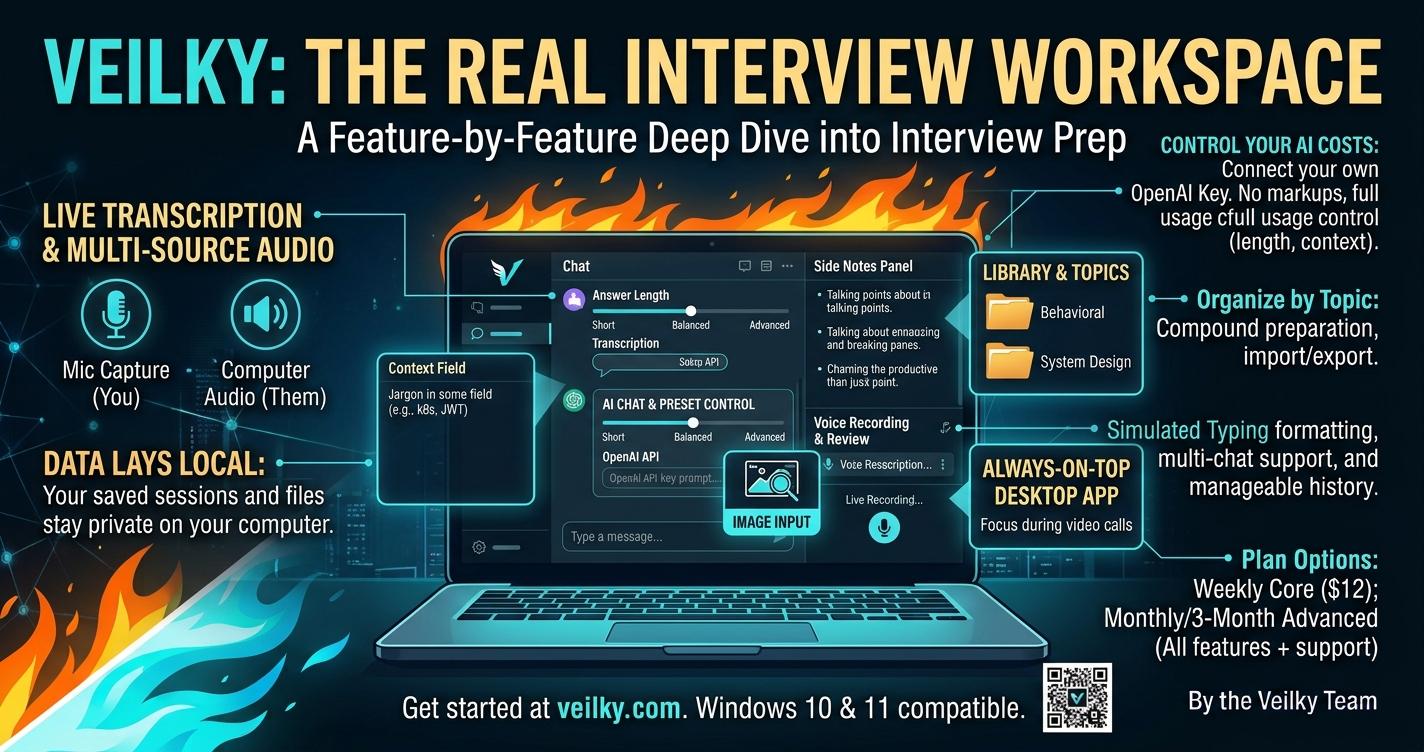
The first decision we made was not to resell AI. Veilky connects to your own OpenAI API key, which means you pay OpenAI directly at cost, with no markup layered on top by us. That single choice shapes how the rest of the product behaves. Because you are paying for your own usage, we can give you real control over it: a model selector so you decide where to spend on speed versus depth, an "Answer length" setting that ranges from Short to Balanced to Advanced, and a "Maximum recent messages" control that determines how much of the conversation the AI actually reads before responding.
That last setting matters more than it sounds. It is the difference between an AI that gets buried in a long practice session and one that stays focused on the question in front of you. Giving users that dial—rather than hiding it—was a deliberate choice.
The Conversation Has to Match the Interview
Interviews are not purely verbal. A coding problem arrives as a screenshot. A system design question comes with a diagram. A recruiter sends a job description and asks whether your experience fits. A text-only chat box forces you to translate all of that into prose before you can get help, which is exactly the kind of friction that makes practice feel artificial.
Veilky accepts images and screenshots directly in the conversation. You show the AI what you are looking at, and ask your question about it. Combined with support for multiple chats and manageable history, this lets you keep separate threads for separate roles or subjects instead of one long, tangled log—so a system design discussion does not get confused with a behavioral prep session three days later.
The Window Problem
Anyone who has practiced an interview on a laptop knows the ritual: read the question, alt-tab to notes, alt-tab back, lose your place, repeat. The interruption itself is the enemy, because it breaks the illusion of a continuous answer.
Veilky runs as a desktop application on Windows 10 and 11, and it stays on top of your other applications. Your chat, your notes, and your transcript sit above your editor or your meeting software. It is a small thing on paper and a large thing in practice.
Hearing the Interview, Not Just Reading It
The feature that changes the most about how practice feels is live transcription. Veilky writes down what it hears as text in real time, and it can capture audio from two independent sources: your microphone, which picks up your own voice, and your computer's system audio, which picks up whoever is speaking on the other end. Because those controls are separate, you can mute one or stop the other at any moment, so you decide exactly what is being transcribed at any given point.
This is what turns Veilky from a reading tool into a speaking tool. You can rehearse out loud, watch your answer appear as text, and see immediately where a sentence wandered or a point got lost. And because sessions can be saved, both the transcripts and the audio recordings remain available afterward for review. Delivery problems—filler words, buried conclusions, answers that run long—are far easier to fix when you can go back and hear them.
Building Something Worth Reusing
Preparation has a compounding effect that most tools ignore. The answer you craft for "tell me about a time you handled conflict" will be useful again in three weeks, at a different company, with different wording. The questions you have already worked through for a specific role are an asset.
Veilky's Topics feature is built for that. It lets you organize questions and prepared answers by subject, and it supports importing and exporting them to a file—so your library is portable and yours to keep, and you can use them to get your custom answers. A side Notes panel runs alongside the main conversation, keeping your talking points and reminders separate from the AI's output, so you can glance at your own structure instead of scrolling past a wall of generated text.
Both of these are available on the Monthly and 3-Month plans, along with one feature that is easy to misunderstand. Simulated typing means that when you copy text out of Veilky and paste it elsewhere, it arrives as though a person were typing it at a variable pace rather than appearing instantly. It is an input convenience, and we are explicit that it is not a guarantee of undetectability. It is a formatting nicety, not a promise.
Where Your Data Sits
Interview preparation is personal. It includes your real examples, your career history, and your unfiltered attempts at answers you are not yet confident about.
Your saved conversations, transcripts, and topics are stored locally on your computer rather than on Veilky's servers. Our website uses no third-party analytics tracking. We are equally clear about what does leave your machine: content you submit for AI assistance is processed by providers such as OpenAI, and payments are handled by Stripe. The Privacy Policy spells out what is collected, how it is used, and how long it is kept. Local storage is not the same as total isolation, and we would rather say so plainly than let the phrase "private" do more work than it should.
One Plan Structure, No Artificial Ceilings
Veilky does not limit the number of sessions or recording hours on any paid plan. Practice is a volume game—you get better by doing it repeatedly—and capping volume to push an upgrade would undermine the point of the product.
What differs between plans is depth. The Weekly plan at $12 covers the core experience. The Monthly plan at $39 and the 3-Month plan at $99 unlock the advanced features described above—Topics with import and export, the side Notes panel, simulated typing, and the full answer and context controls—along with priority support.
Veilky is available now for Windows 10 and 11. Plans start at $12 per week.